
Service Availability and Booking Limits
The Availability & Limits tab lets you view provider schedules and configure booking constraints.
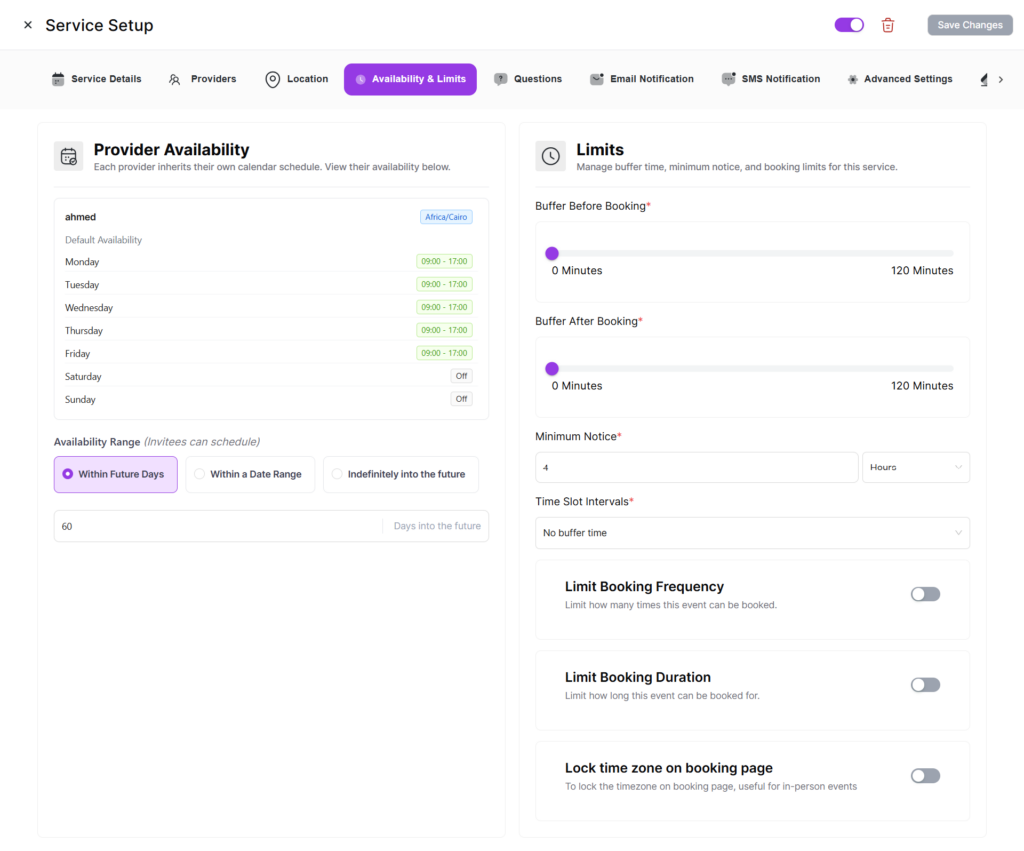
Provider Availability Overview
See a read-only overview of each provider’s weekly schedule including provider name, schedule name, timezone, and weekly hours.
Note: Provider availability is configured from each provider’s own settings. The service respects each provider’s personal schedule.
Buffer Times
Buffer Before Booking adds a gap before a booking starts. Buffer After Booking adds a gap after a booking ends. This prevents back-to-back appointments.
Minimum Notice Period
Set minimum advance notice required (configurable in minutes, hours, or days). Default is 4 hours. For example, 4 hours means customers cannot book slots within the next 4 hours.
Time Slot Intervals
Override default duration-based intervals. For example, a 60-minute service can show slots every 30 minutes (9:00, 9:30, 10:00…).
Booking Frequency
Limit how many bookings a customer can make within a specific period.
Scheduling Window (Event Range)
- Days — Allow bookings up to X days ahead (default: 60).
- Date Range — Only allow bookings within a specific range.
- Infinity — No future limit.
Timezone Display
Configure timezone display: auto-detect customer timezone, lock to specific timezone, or let customer choose.