
Managing Service Providers
Providers are the team members (hosts) who deliver a service. Each provider is represented by a host calendar. A service can have multiple providers, and each provider’s availability is calculated independently.
How Providers Work
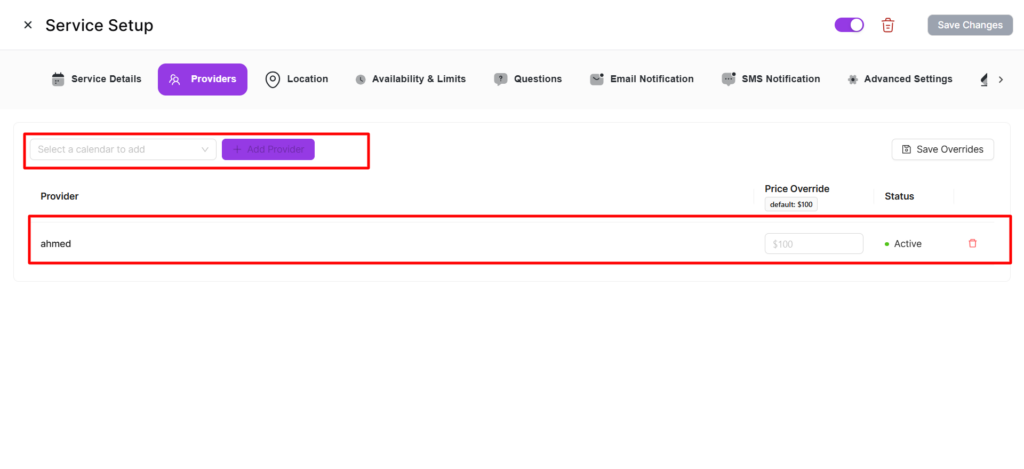
- When you create a service, your host calendar is automatically linked as a provider.
- Available time slots are computed per-provider using each provider’s personal availability schedule.
- Customers see slots from all active providers and can select which provider they want.
- Booking conflict checks are done per-provider — one provider being fully booked doesn’t affect others.
Adding Providers (Admin)
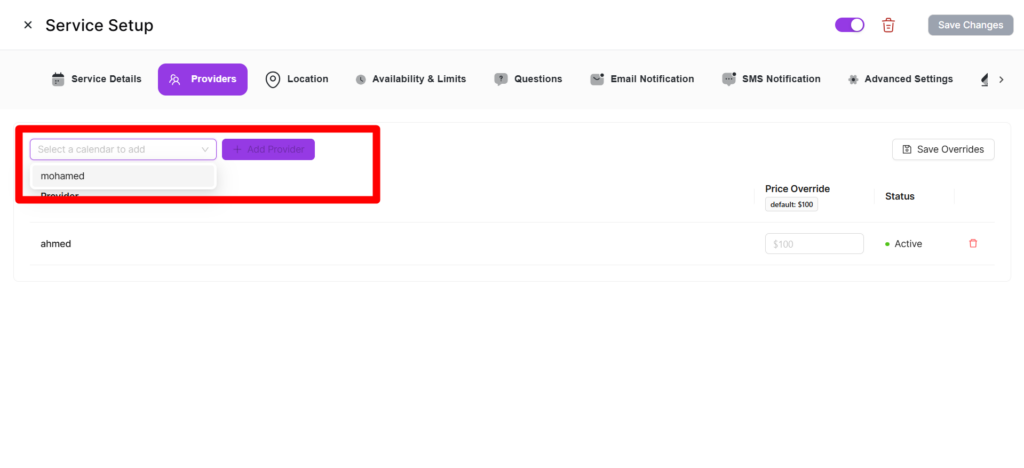
- Open the service and go to the Providers tab.
- Select a host calendar from the dropdown.
- Click “Add Provider”.
- Click “Save Changes”.
Join / Leave a Service (Team Members)
- Join — Click “Join Service” to add your host calendar as a provider.
- Leave — Click “Leave Service” to remove yourself from new bookings.
Per-Provider Overrides
| Override | Description |
|---|---|
| Price | Custom price for this provider. Leave empty to use service base price. |
| Min Capacity | Override minimum booking capacity. |
| Max Capacity | Override maximum booking capacity. |
| Status | “Active” or “Inactive” to control bookings. |
Removing a Provider
Admins can remove providers from the Providers tab. Existing bookings are not affected.
Provider Integrations
A service’s connected integrations (Google Calendar, Zoom, Outlook, Apple Calendar, Twilio) are aggregated across all active providers. An integration is “connected” if any provider has it configured.