PayPal Integration with QuillBooking
QuillBooking makes it easy to integrate PayPal as a payment gateway, enabling you to accept online payments. By offering PayPal as a payment option, you can provide a secure and convenient checkout experience for your customers.
This integration allows you to accept payments globally, ensuring secure transactions with PayPal’s trusted infrastructure.
Enable PayPal Payment
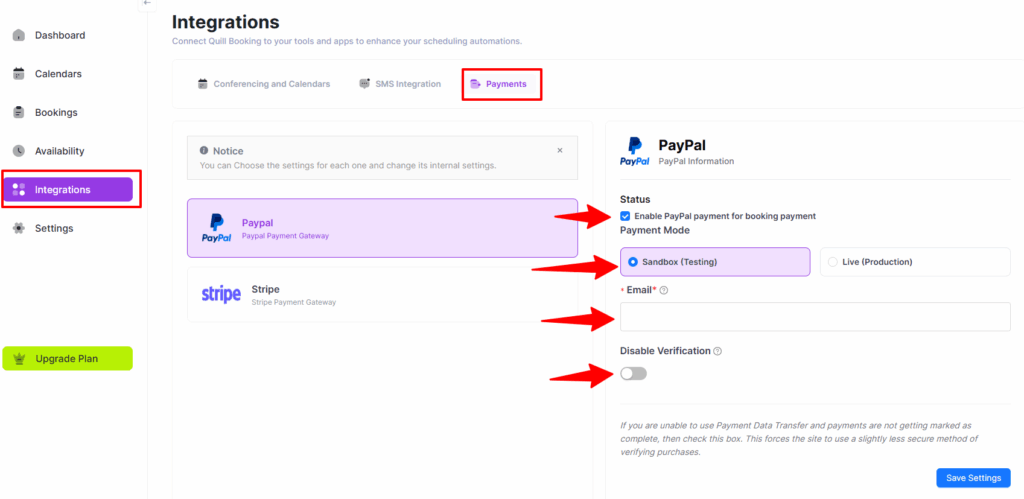
Navigate to QuillBooking > Integrations, and select Payments tab.
Now check on the Enable PayPal Payment for Booking Payment to enable the PayPal Payment option.
- Payment Mode: Here you will see two Payment Modes.
- Sandbox Mode: Only for testing purposes.
- Live Mode: Take Live payment for your events.
- PayPal Email: Here you just need to give your PayPal business email address only.
- Disable PayPal IPN Verification: If you are unable to use Payment Data Transfer and your payments are not being marked as complete, then toggle to Disable PayPal IPN Verification. Enabling this option forces the site to use an alternative verification method, which is slightly less secure but ensures that purchases are processed and marked as complete.