Quick answer
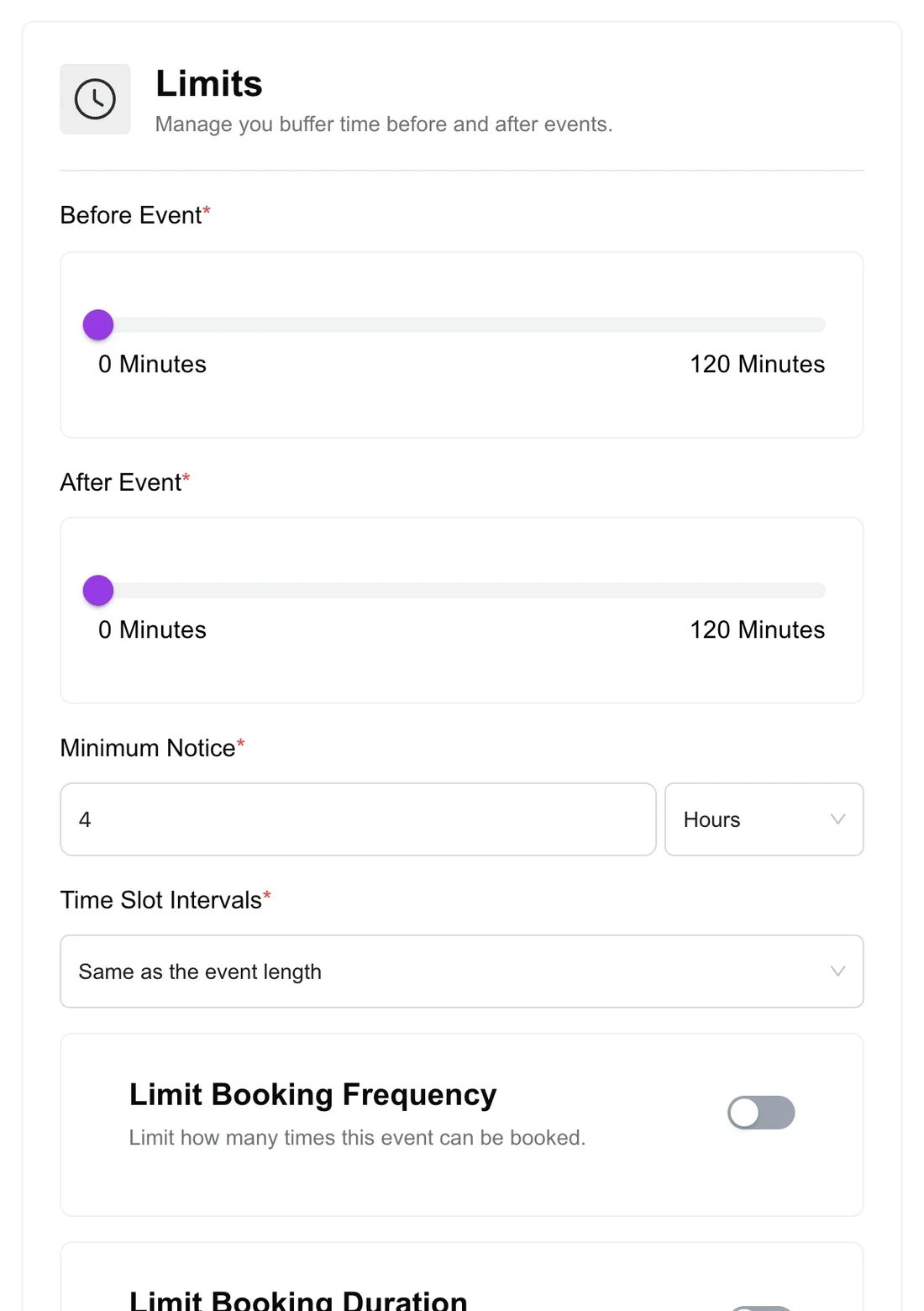
Buffer time is a gap added before or after each appointment so they cannot be booked back to back. Minimum notice is how far ahead someone must book (for example, at least 4 hours). The booking window is how far into the future people can book (for example, the next 60 days). Together with slot intervals and booking limits, they keep your calendar realistic.
Most scheduling frustration comes from rules nobody set: clients booking a slot that starts in ten minutes, calls stacked with no break, or bookings six months away that are forgotten. These five settings fix that. Here is what each one means and sensible starting values.
Disclosure: We make Quill Booking, so we use it for the screenshots and examples. The advice works with most booking plugins and scheduling tools.
The five settings at a glance
| Setting | What it does | Typical value |
|---|---|---|
| Buffer before | Blocks time before each appointment | 0 to 15 minutes |
| Buffer after | Blocks time after each appointment | 10 to 15 minutes |
| Minimum notice | Stops last-minute bookings | 4 to 24 hours |
| Booking window | Limits how far ahead people can book | 30 to 60 days |
| Slot interval | Sets which start times appear | 15 or 30 minutes |
Buffer time
A buffer is invisible to clients: it simply removes the slots that would sit too close to another booking. Use a buffer after for notes, overruns or cleaning a treatment room, and a buffer before for travel or preparation.
Minimum notice
Minimum notice stops people from booking a slot that starts too soon for you to prepare. With a 4-hour notice, at 10:00 the earliest bookable slot is 14:00. Use 24 hours or more if you need to prepare materials or travel.
Booking window
The booking window, sometimes called the availability range, controls how far ahead people can book: a rolling number of days, a fixed date range, or indefinitely. Long lead times are one of the strongest predictors of no-shows in healthcare research (Dantas et al., 2018), so many businesses limit bookings to the next 30 to 60 days.
Slot intervals
The slot interval controls which start times are offered. A 60-minute session with a 30-minute interval shows 9:00, 9:30, 10:00 and so on, which gives clients more choice. A 60-minute interval shows only 9:00, 10:00 and 11:00, which keeps your day tidier.
Booking limits
Limits cap how many bookings an event can take per day, week or month, or how much total time can be booked. They are useful for demanding work, such as no more than four coaching calls a day.
Recommended starting points
| Business | Buffer after | Minimum notice | Booking window |
|---|---|---|---|
| Consultant or coach | 15 min | 12 to 24 hours | 30 days |
| Salon or spa | 10 to 15 min | 2 to 4 hours | 60 days |
| Clinic | 5 to 10 min | 2 hours | 30 to 90 days |
| Sales demos | 10 min | 2 hours | 14 to 21 days |
Frequently asked questions
What is buffer time in scheduling?
A gap added before or after each appointment so the next one cannot start immediately. Clients do not see it; it simply removes slots that are too close together.
What is minimum notice for booking?
The shortest time between booking and the appointment. With a 24-hour notice, nobody can book a slot that starts within the next 24 hours.
How far in advance should clients be able to book?
Thirty to sixty days suits most businesses. Long lead times increase the chance of no-shows.
Do buffers apply to events from my synced calendar?
In most booking plugins, buffers are applied around your appointments, and synced calendars block busy times. Check your plugin’s documentation for how it treats synced events.
Related guides
Set the rules once, book on autopilotQuill Booking includes buffers, minimum notice, booking windows and limits in the free version.
Get it free